Can I add Gift messages on my order?Updated 9 months ago
How to Add a Gift Message to Your Amazon Order
Add the item to your cart and proceed to Checkout.
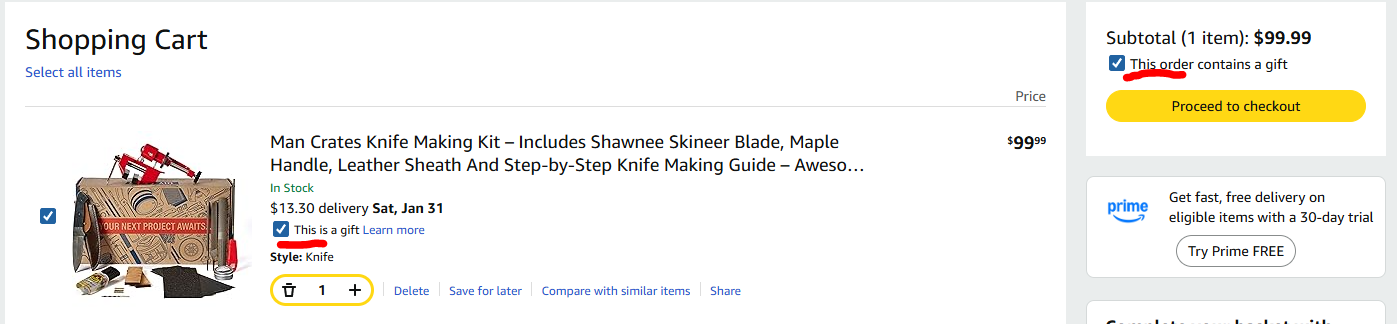
On the shopping cart page, you will have to tick the box that says "This is a gift". It is located under the amount and estimated delivery date. Also make sure that the tick box on the subtotal amount above the Proceed to check out button is ticked.
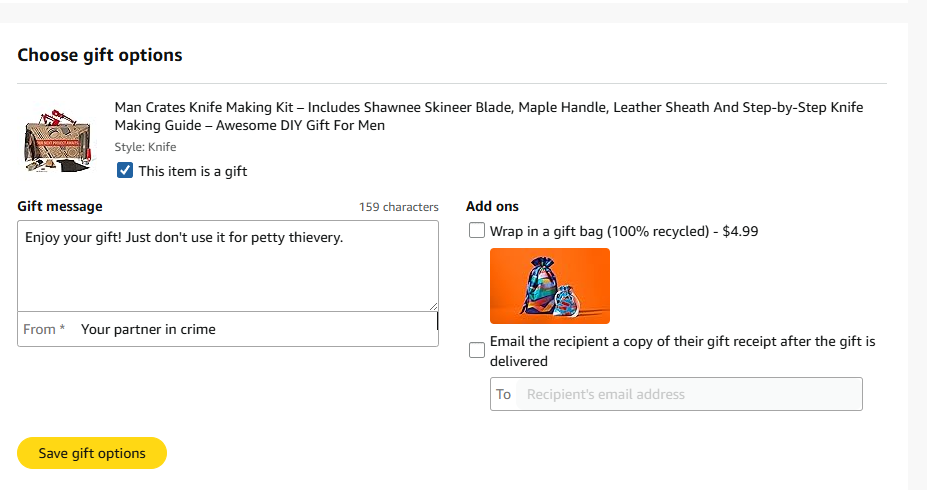
On the checkout page, you will see a box where you can enter your message and name. You can also tick the add ons
Review your order and complete checkout.
Important Notes
Gift messages are only available for eligible items.
Messages are printed and included by Amazon, not the seller.
Gift messages cannot be added or edited after checkout.
An Amazon gift message looks like a simple, computer-printed note on a plain card or the packing slip, featuring your personalized text in a clean sans-serif font, often without much branding, appearing either tucked in or within a "Don't spoil the surprise" envelope if gift-wrapped.
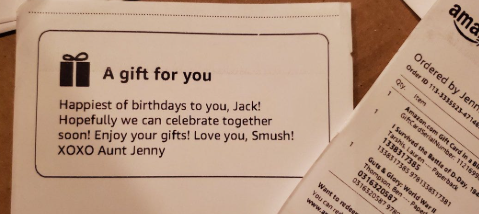
- Appearance: A small card (around 3.5x5 inches) or the packing slip itself.
- Design: Minimalist, with your message in black ink, centered, using a simple font like Arial.
- Packaging: If gift-wrapped, the message card is in a special envelope marked "Don't spoil the surprise". If not wrapped, it's usually just on the packing slip.
- Content: Includes your custom text and the recipient's name/address (from the shipping label) on the slip, with prices hidden.
- Delivery: Sent via email to the recipient.
- Content: A digital message you compose, often with options for themes or designs, letting the recipient "unwrap" it digitally or provide their address.